
- VIRTUAL BRIDGE
Virtual Bridge(L2)



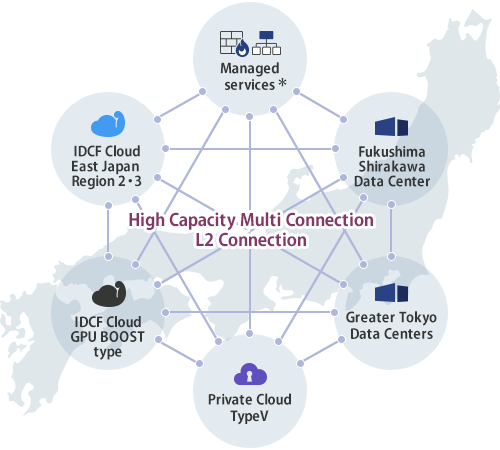
High capacity layer 2 network connections, which is secure while accessible from multi-points.
Virtual Bridge is IDC Frontier's closed network services which connects each services on a Clos Fabric, of which total capacity is more than 160 Gbps. Broadband and seamless connection is established between services.
* Provided only with Managed Firewall and Managed Load Balancing.
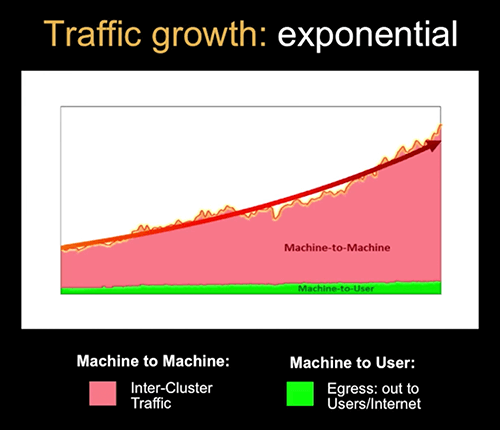
Why should a closed network be broadband? Because Machine to Machine (M2M) data traffic has been increasing.
As IoT and big data have been gaining popularity in recent years, traffic between clouds and servers, which does not go through the Internet, is increasing. This will make closed broadband network more important assets, which help maximize the effectiveness of the M2M communications.
Introduction to Facebook's data center fabric
https://www.youtube.com/watch?v=mLEawo6OzFM
Features
Lead time as short as 5 business days
Subscribe to it, and it will be available as short as in a week*. Able to respond quickly to sudden needs for system expansion.
* When the connection is between IDCF Cloud zones.
Easy system configurations
The layer 2 connection does not require configurations such as for routing. Systems are integrated seamlessly on "one network" even if they are physically apart.
Secure closed network connection
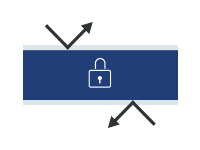
Connect IDC Frontier services with the highly reliable closed network without going through the Internet. The connection is securer than that using the Internet VPN.
Outstanding availability achieved with redundant configurations
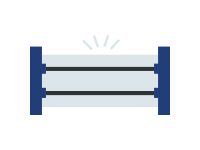
No matter where your destination is, configurations are redundant as the standard, which give you ability to switch a route smoothly if a problem occurs.
A service level of 99.99% uptime guaranteed

Monthly downtime is guaranteed not to excess 259.2 seconds (approx. 4 minutes). We guarantee high availability, not just offering the redundancy.
Recommended for:
Processing massive amount of data for data analysis
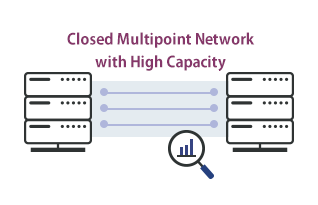
Virtual Bridge provides mutual connections between IDC Frontier's Data Centers or among cloud, or between them, enabling you to process huge amount of traffic data.
Disaster recovery measures
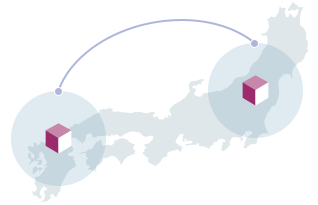
Connect your systems deployed in IDC Frontier's Data Centers with Virtual Bridge. Layer 2 connection makes data migration an easy task, if you ever need to do it.
Responding to steep decline of available server resources
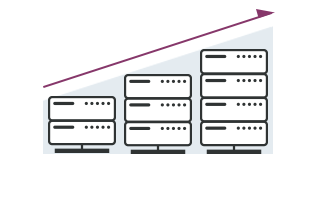
You can subscribe to Virtual Bridge and as quick as in 5 business days it will be avaialable for you. When you are in an urgent situation, the short lead time let you use the service in a timely manner.
What is the difference between Virtual Bridge and Private Connect?
IDC Frontier offers 2 different types of closed nettwork services. Select whichever fits your needs.
Virtual Bridge is appropriate for connecting your systems on IDC Frontier's Data Centers and cloud services, or simply having a broadband network.
| Virtual Bridge(L2) | PrivateConnect(L3) | |
|---|---|---|
| Connection Layer | L2 | L3 |
| Network bandwidth | Up to 10 Gbps (dedicated) *In the case of a physical interface |
1 Gbps (shared) |
| Destination | ・IDC Frontier services ・Carrier lines (only at certain Data Centers) *except for some part of the services |
・IDC Frontier services ・Carrier lines ・Other Data Center providers |
Main specifications
| Network configurations | Redundant configurations | |
|---|---|---|
| Services connectable | Cloud | ・IDCF Cloud EAST-Region 1/2/3, IDCF Cloud WEST-Region ・Private Cloud TypeV |
| Data Center(*2) | ・Fukushima Shirakawa Data Center ・Tokyo Fuchu Data Center ・Tokyo Ariake Data Center ・Tokyo Nihombashi Data Center ・Fukuoka Kitakyushu Data Center |
|
| Carrie Line Connection | ・Fukushima Shirakawa Data Center ・Tokyo Ariake Data Center |
|
| Provided bandwidth | Fukushima Shirakawa Data Center | 1 Gbps or 10 Gbps |
| Tokyo Fuchu Data Center | 1 Gbps or 10 Gbps | |
| Tokyo Ariake Data | 1 Gbps or 10 Gbps | |
| Tokyo Nihombashi Data Center | 1 Gbps | |
| Fukuoka Kitakyushu Data Center | 1 Gbps | |
| Carrier lines | 100 Mbps or 1 Gbps | |
| Standard lead time (*1) | Logical interface | 5 business days |
| Physical interface | 15 business days | |
| Carrie Line Connection Interface (*3) | 10 business days | |
*1 The leading time shall be calculated from the next business day of the day IDCF receives Customer's application for the service, as well as the Confirmed Settings form which is filled with all the information necessary to provide the service. Extra days may be added to the leading time depending on the situation or details of the application.
*2 You need to purchase a physical interface. (except for the case you have already have a physical interface supporting Virtual Bridge)
*3 The lead time does not include the period that a carrier line is being installed.
Price List
Data Center Connection
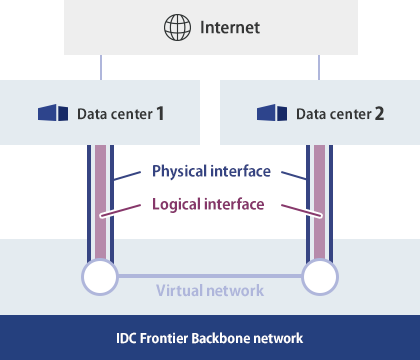
| Initial cost | Monthly cost | ||
|---|---|---|---|
| Virtual Network | ¥0 | ¥0 | |
| Data Center 1 | Physical Interface (1 Gbps) | ¥170,000 | ¥140,000 |
| Logical Interface (1 interface) | ¥20,000 | ¥10,000 | |
| Data Center 2 | Physical Interface (10 Gbps) | ¥240,000 | ¥590,000 |
| Logical Interface (1 interface) | ¥20,000 | ¥10,000 | |
| Total | ¥450,000 | ¥750,000 | |
Cross-Region Connection
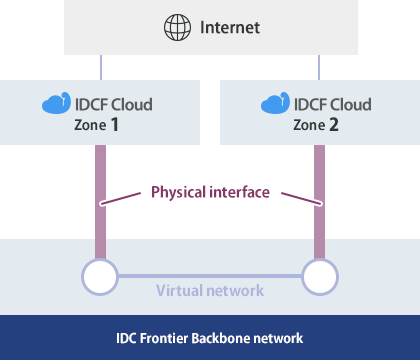
| Initial cost | Monthly cost | ||
|---|---|---|---|
| Virtual Network | ¥0 | ¥0 | |
| IDCF Cloud Zone 1 | Logical Interface (1 interface) | ¥20,000 | ¥0(*) |
| IDCF Cloud Zone 2 | Logical Interface (1 interface) | ¥20,000 | ¥0(*) |
| Total | ¥40,000 | ¥0 | |
Connection between IDCF Cloud and a Data Center
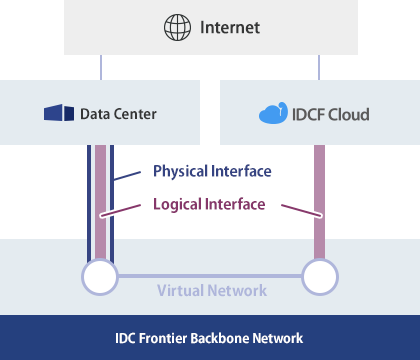
| Initial cost | Monthly cost | ||
|---|---|---|---|
| Virtual Network | ¥0 | ¥0 | |
| Data Center | Physical Interface (10 Gbps) | ¥240,000 | ¥590,000 |
| Logical Interface (1 interface) | ¥20,000 | ¥10,000 | |
| IDCF Cloud | Logical Interface (1 interface) | ¥20,000 | ¥0(*) |
| Total | ¥280,000 | ¥600,000 | |
Carrie Line Connection
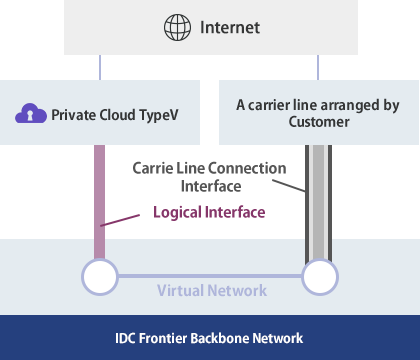
| Initial cost | Monthly cost | ||
|---|---|---|---|
| Virtual Network | ¥0 | ¥0 | |
| Private Cloud TypeV | Logical Interface (1 interface) | ¥20,000 | ¥10,000 |
| A carrier line arranged by Customer | Carrie Line Connection Interface (1 interface) | ¥0 | ¥18,000 |
| Total | ¥20,000 | ¥28,000 | |
※The listed prices do not include tax.
 |
What is good about using the L2 connections? |
 |
Connecting services with the L2 network allows you to configure systems on the same network. Designing an L2 network is easy, no routing is necessary, unlike connecting by L3. |
|
|
Is any bandwidth guarantee provided? |
|
|
Yes. For a physical interface, you can select between 1 Gbps and 10 Gbps. As for a logical interface, it depends on the specifications of the network interface. |
|
|
Can I connect my on-premise systems in my office or systeyms in other provider's Data Center connected to Virtual Bridge? |
|
|
In ordre to connect to your on-premise systems or systems in other provider's Data Center, use PrivateConnect. |
|
|
Do I need to install a physical interface in order to connect to a Data Center? |
|
|
Yes. Since the redundant configuration is the standard, you will need to 2 interfaces as a set. |
